Sinhala subtitles for CapCut,
done in minutes.
ඔබේ වීඩියෝවලට සිංහල උපසිරැසි – විනාඩි කිහිපයකින්.
Open your CapCut project, click Generate, and get Sinhala subtitles timed to your voice – styled, animated and placed straight on your CapCut timeline. English words stay in English. FM fonts just work.
Windows 10 & 11 · macOS 12+ on Apple Silicon · LKR 1,999 / month
Minutes
not hours of typing
සිං + En
Sinhala & English in one line
45+
ready-made caption looks
Win & Mac
works with CapCut desktop
How it works
From raw video to subtitled video in 4 steps
No typing, no copy-pasting, no fighting with fonts.
-
1
Pick your project
SinSub finds your CapCut projects on its own. Choose the one you're working on.
-
2
Click Generate
AI listens to your video and writes Sinhala subtitles, timed to when each line is spoken.
-
3
Make it yours
Fix a word, adjust timing on the timeline, choose your font and a caption look. See it live.
-
4
Add to CapCut
One click puts every subtitle on your CapCut timeline, ready to export.
Features
Everything you need for Sinhala subtitles
Made for Sri Lankan creators, for the way we actually talk.
Accurate Sinhala from your voice
Natural spoken Sinhala, correctly spelled and timed to your speech. Wrong letters are caught and fixed automatically.
English words stay English
Say “layer”, “comment” or “viral” and it stays in English letters – just like people really talk. Prefer Sinhala letters? One switch.
Your favourite FM fonts
FM Derana, FM Samantha, FM Gemunu and more. Unicode → FM conversion is automatic, and English words get a proper English font.
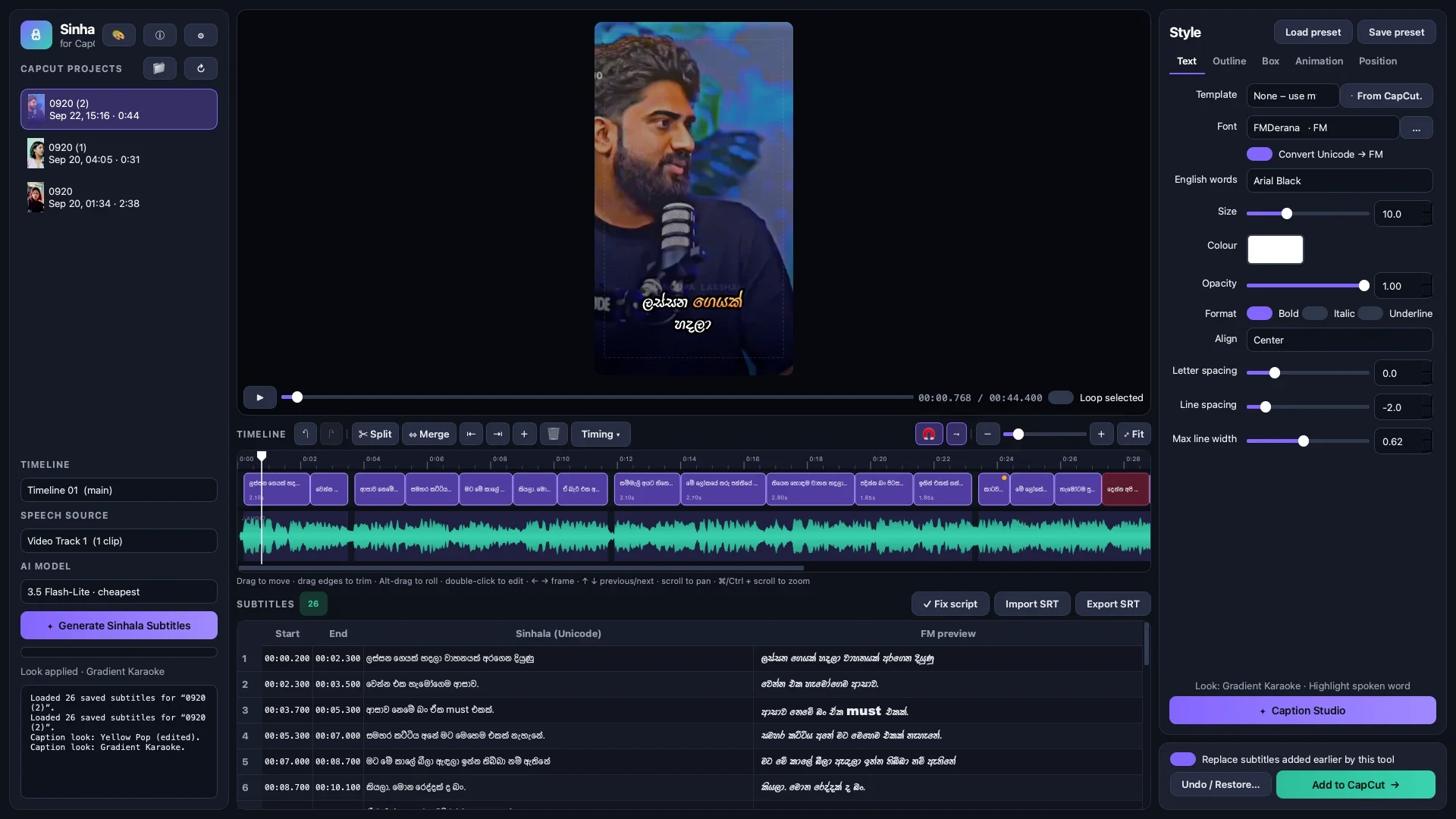
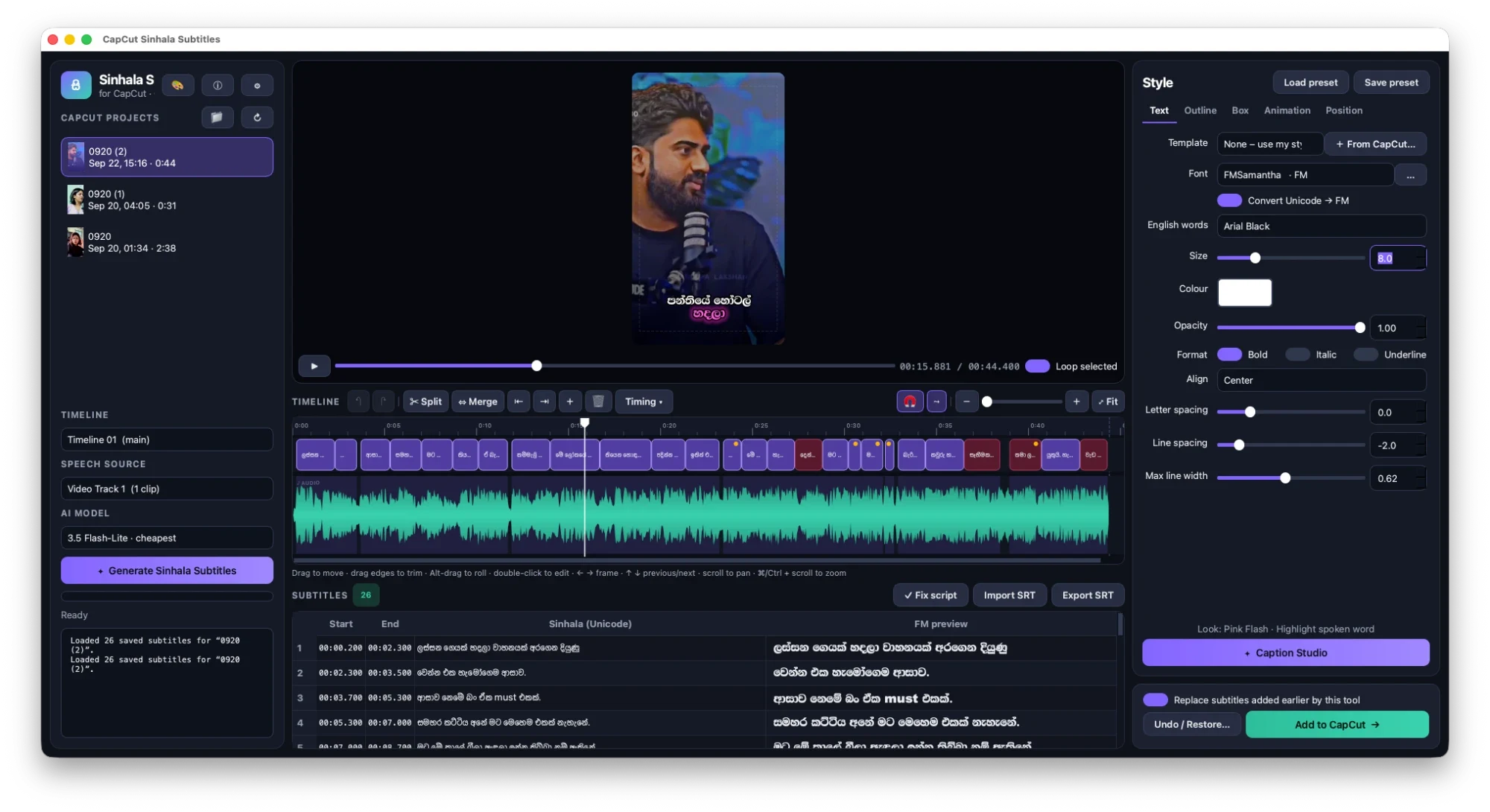
Timeline editor with waveform
See your audio and subtitles together. Drag to move, pull edges to trim, split and merge – with unlimited undo.
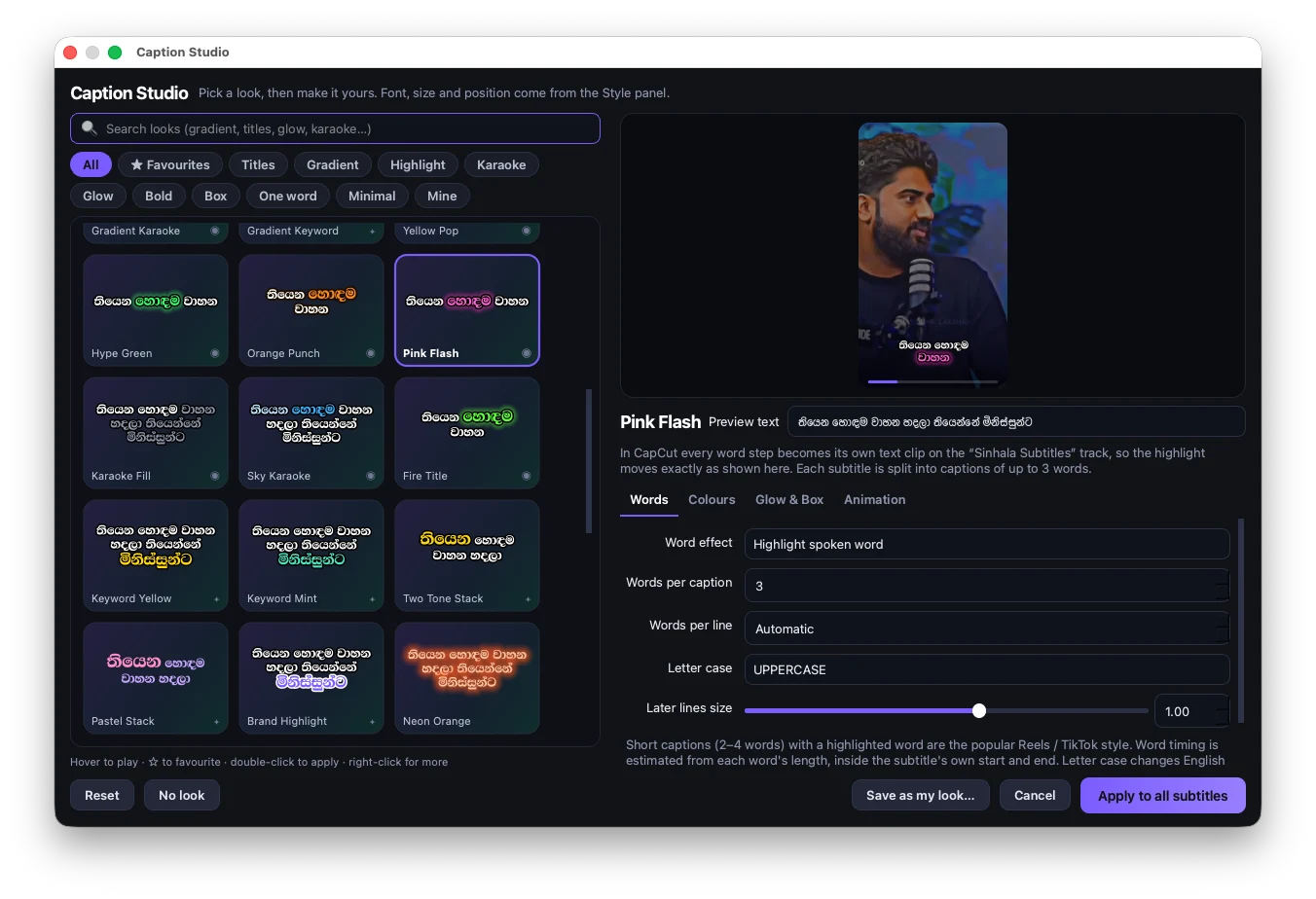
Caption Studio
45+ trendy looks – karaoke highlight, gradients, glow, titles, one word at a time. Tweak any look and save your own.
Animations that match CapCut
Fade, pop, slide, typewriter, word-by-word and more – exactly the same animations you'll see inside CapCut.
Live preview
Play your video with the subtitles on top before anything touches CapCut. What you see is what you get.
Safe for your projects
Every change is backed up first. Changed your mind? Restore your CapCut project with one click.
Catches every word
Speech over music or in quick moments gets a second listen, so lines aren't missed.
Caption Studio
Trendy captions that stop the scroll
The styles you see on Reels and TikTok – now in Sinhala. Pick a look, hit apply, done.
- ✓Karaoke highlight – the word being spoken lights up.
- ✓Gradients, glow & neon – bold looks in one click.
- ✓Short-form captions – 2–4 words at a time, or one word at a time.
- ✓Title looks – two-tone names, bold + thin, name with a role line.
- ✓Save your own looks and keep your brand consistent on every video.
Timeline editor
Perfect timing, without the headache
Your subtitles sit right on top of your audio waveform, so you can see exactly where every line belongs.
- Drag & trim
- Move lines or stretch them to fit.
- Split & merge
- Break long lines, join short ones.
- Edit in place
- Double-click a line to fix a word.
- Undo anything
- Experiment freely, go back anytime.
Pricing
One simple plan. Everything included.
Less than the cost of one hour spent typing subtitles by hand.
Creator
All featuresLKR 1,999 / month
- Unlimited Sinhala subtitles for your CapCut projects
- FM font conversion & English-word support
- Caption Studio with 45+ looks + your own
- Timeline editor, live preview & animations
- SRT import & export
- Windows & Mac, all new features and fixes
Download the app free, then activate it with your license key.
You'll also need
- CapCut desktop on Windows or Mac
- An internet connection
- A free Google AI key – takes about 2 minutes to create
FAQ
Questions? Answers.
Does it work with CapCut on my phone? +
SinSub works with the CapCut desktop app on Windows and Mac. Edit on your computer, and your project syncs as usual.
How accurate are the subtitles? +
Very good for clear speech – most videos need only a few small touch-ups. You can check and edit every line in the app before it goes to CapCut.
Can I use FM fonts? +
Yes. Pick any FM font installed on your computer and the subtitles are converted for it automatically. English words inside a line get an English font, so they display correctly too.
Will it mess up my CapCut project? +
No. SinSub backs up your project before every change and adds the subtitles on their own text track. You can restore the earlier version with one click.
What is the Google AI key and does it cost extra? +
It's a personal key from Google that SinSub uses to listen to your videos. You create it yourself in a couple of minutes, and Google offers a free tier that covers typical use. Heavy use may need a paid Google plan.
How do I activate the app? +
After you subscribe you receive a license key. Open SinSub, paste the key, and you're in. You only need to do this once on your computer.
Which computers are supported? +
Windows 10 and 11 (64-bit), and Macs with Apple Silicon (M1 or newer) running macOS 12 or later.
My Mac says the app can't be opened. What do I do? +
The first time only: open your Applications folder, right-click CapCut Sinhala Subtitles, choose Open, then click Open again. After that it opens normally.
Your next video deserves Sinhala subtitles
අදම පටන් ගන්න.
Download SinSub, activate your license and subtitle your first video in minutes.
LKR 1,999 / month · Get your license key